Deploy fails → MoxyCode fixes it automatically

Fix Salesforce deployment errors
in seconds

Turn deployment errors into one-click fixes — inside VS Code. No tab switching. No guesswork.

Built for Salesforce developers working with Apex, LWC, and real deployment workflows.

No copy-paste. No tab switching. Everything stays inside VS Code.

Install Free Extension See Features

Free install from VS Marketplace · Review every change before applying · Offline Mode available when code must stay local
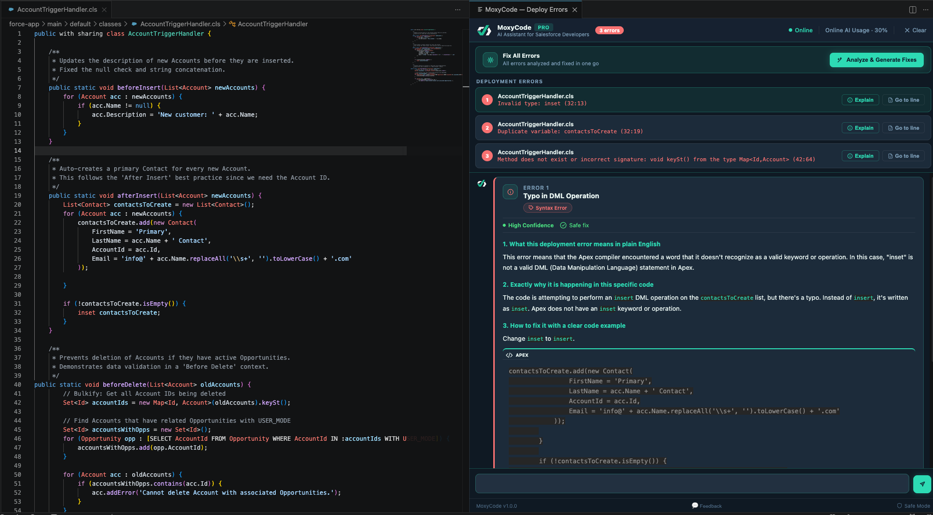
MoxyCode deploy error panel showing Salesforce deployment errors ready for AI fixes
Trust & Control

Fast when you want it. Controlled when it matters.

MoxyCode lets Salesforce teams choose the level of control for every fix. Move quickly with Auto Mode, slow down with Safe Mode, and keep sensitive code local with Offline Mode.

Nothing is saved until you save
No hidden saves or commits
Online or Offline execution
Built for governed Salesforce delivery

MOXYCODE CONTROL LAYER

Developer-controlled AI for Salesforce delivery

Developer controlled
👁️

Safe Mode for manual review

Review every fix, click Apply Fix, inspect the change, and save only when you are ready.

Auto Mode for faster fixes

MoxyCode can update the file automatically, but you still decide when to save. No hidden saves. No automatic commits.

☁️

Cloud AI or Local AI

Cloud AI when you want speed. Local AI when code cannot leave your machine.

🛡️

Security-first recommendations

Suggestions are built for developer review, secure code, and governance-friendly Salesforce delivery.

Everything you need
inside VS Code

Turn deployment errors into one-click fixes. No copy-pasting into ChatGPT. No context switching. AI that lives where you code.

Fix deployment errors instantly

Deploy fails? MoxyCode opens automatically with every error listed — file, line, and description. Hit Re-analyse & Generate Fixes and all errors are resolved in one go.

Auto-opens on Deploy Fail
🔍

Fix all warnings in one click

Static analysis catches issues before you deploy. SOQL inside loops, DML misuse, null dereferences — spotted and fixed in a single sweep without touching the deploy cycle.

SOQL · DML · Bulk Patterns
🛡️

Security-first fixes

Automatically enforces WITH USER_MODE and safe data access patterns. Fixes that meet Salesforce security standards — not just fixes that compile.

USER_MODE · Record-Level Security

Trust every fix

Every suggestion includes a Confidence level and Risk rating so you know what's safe to apply before you click. No blind guessing. Just clear, safe signals.

High Confidence · No Risk
🌐

Deploy without leaving VS Code

Right-click any .cls, .trigger, or LWC file and choose MoxyCode: Deploy to Org — deployment errors are captured automatically and fed straight into the fix loop. No terminal, no tab switching.

SF CLI · Direct Deploy
📡

Works fully offline

Sensitive org? Air-gapped environment? Run MoxyCode with a local AI model — guided setup included. Your code never leaves your machine.

Local · Air-Gapped

Built for Salesforce —
not generic AI

Generic AI tools don't understand Salesforce complexity.

GENERIC AI TOOLS
  • ✗  No concept of governor limits
  • ✗  Can't read org-specific deploy errors
  • ✗  Suggests fixes that break in Salesforce
  • ✗  No security awareness (USER_MODE etc.)
  • ✗  Requires constant copy-pasting
MOXYCODE
  •  Knows governor limits & bulkification
  •  Auto-opens on every deployment failure
  •  Fixes that actually deploy successfully
  •  Enforces USER_MODE & record-level security
  •  Confidence + Risk rating on every fix

Fix errors in 4 simple steps

01

Deploy your code

Deploy any Apex class, trigger, or LWC from VS Code as you normally would. The moment a deployment error comes back from Salesforce, MoxyCode intercepts it automatically.

02

Panel opens automatically

No manual steps. The MoxyCode — Deploy Errors panel opens instantly, listing every error with its file, line, and description. Click Explain to understand an error, or hit Re-analyse & Generate Fixes to fix all of them in one go.

03

Review the fix — confidence & risk included

Each fix comes with a clear explanation, the corrected code, a What Changed summary, and Confidence + Risk ratings — so you always know how safe it is before you apply it.

04

Apply & redeploy in seconds

Click Apply Fix. The corrected code lands directly in your file. Redeploy and move on. Each new deployment resets the panel — keeping your workflow clean and focused.

Everything you need to get started

Installation, commands, offline setup, Safe Mode, deployment — all covered in the full docs.

View Full Documentation →

Simple, transparent pricing

Start free. Upgrade when you need full power.

Free
A$0 AUD / month

Install the extension and try MoxyCode with 5 AI fixes per day. No credit card required.

  • 5 AI fixes per day
  • Explain errors directly inside VS Code
  • AI-powered deployment error explanations
  • Deploy to Org from VS Code
  • AI chat assistance
  • One-click apply fixes
  • Bulk "Fix All" actions
  • Offline mode
Enterprise
Custom

For teams with security and compliance requirements.

  • Fully offline / on-prem deployment
  • Works in restricted & air-gapped environments
  • No data leaves your environment
  • Team management & seat licensing
  • Confidence & Risk ratings — safe team adoption
  • Priority support & SLA
  • Security review & compliance docs
  • Onboarding & training

No credit card required · Cancel anytime

Prices in AUD · Converted at checkout for international customers

Tell us how we can help

Send feedback, report an issue, request a feature, or contact support.
We read every message.

0 / 1000
Replies go to the email you provide

Install Today

Stop debugging Salesforce errors.
Start shipping.

Join Salesforce developers using MoxyCode to eliminate governor limit errors,
fix deployment failures, and ship clean Apex faster.

No copy-paste. No switching tabs. Everything inside VS Code.

Install Free Extension Read the Docs

Works inside VS Code · No setup required · Your code stays private